Broadpeak BKS
The purpose of this document is to provide information on integrating Broadpeak's BKS packager with the Big Blue Marble (formerly Insys) Cloud DRM service.
The Cloud DRM service supports CPIX, which is used to obtain the keys required for encrypting content using Broadpeak's BKS packager.
Configuration
Broadpeak's BKS packager uses the Broadpeak CPIX interface based on the DASH-IF Implementation Guidelines. Depending on the DRM provider, the packager automatically selects the proper systemId from a supported list:
| System | systemId | Streaming protocol |
|---|---|---|
| Microsoft PlayReady | 9a04f079-9840-4286-ab92-e65be0885f95 | Microsoft Smooth Streaming and MPEG-DASH Streaming |
| Google Widevine | edef8ba9-79d6-4ace-a3c8-27dcd51d21ed | MPEG-DASH Streaming |
| Apple Fairplay | 94ce86fb-07ff-4f43-adb8-93d2fa968ca2 | HLS Streaming |
Output configuration
To configure DRM settings for a live service, navigate to the Outputs tab and select the Encryption Settings section. Depending on the output type, specific settings must be provided.
To configure your settings, you will need specific parameters and addresses. These can be found in the Cloud Video Kit web console. Once you're there, select the Configuration page in the DRM module from the side menu. The parameters you need are located in the KMS tab.

DASH
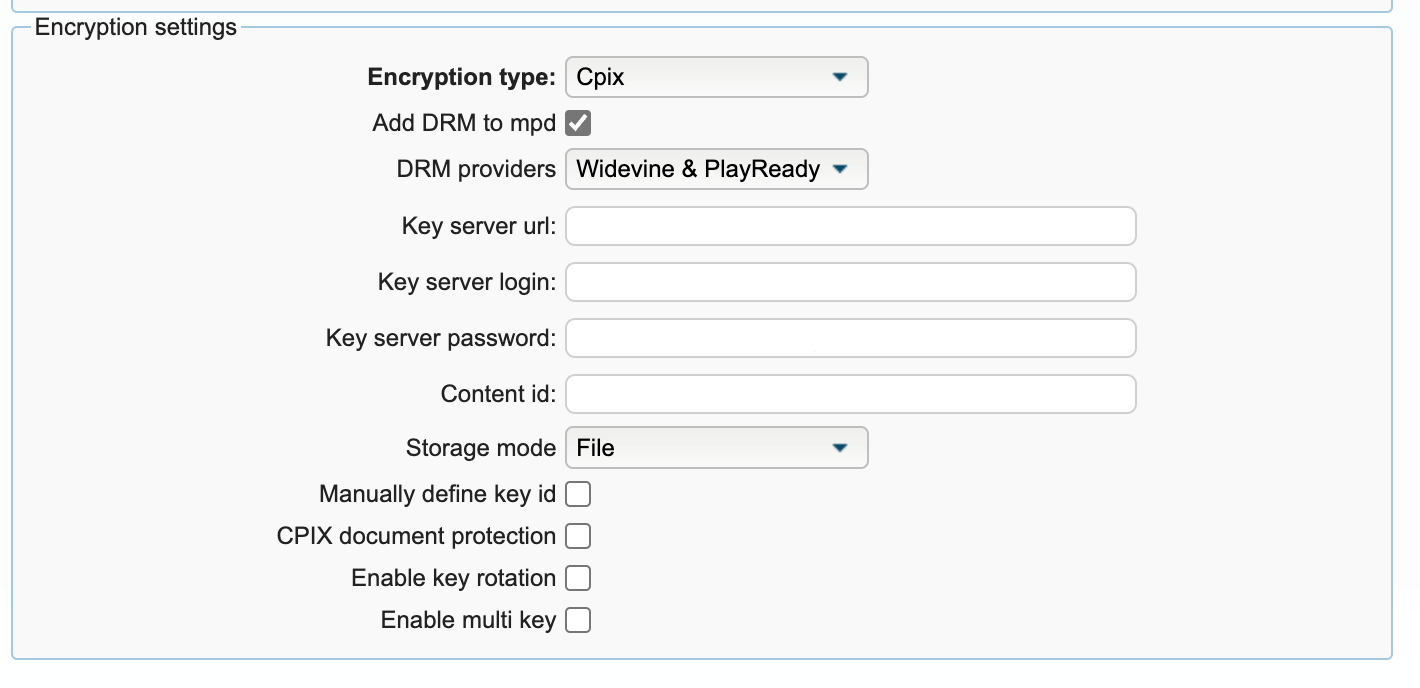
- Encryption type - Select CPIX
- Add DRM to mpd - selected (enables adding DRM information to DASH manifest)
- DRM providers - Select one of the following (depending on the workflow): PlayReady, Widevine, Widevine & PlayReady, Custom DRM, Custom DRM & PlayReady, Custom DRM & Widevine, Custom DRM & Widevine & PlayReady
- Key server URL - CPIX URL from the API section at Cloud Video Kit web console
- Key server login - Login from the Authentication section at Cloud Video Kit web console
- Key server password - Password from the Authentication section at Cloud Video Kit web console
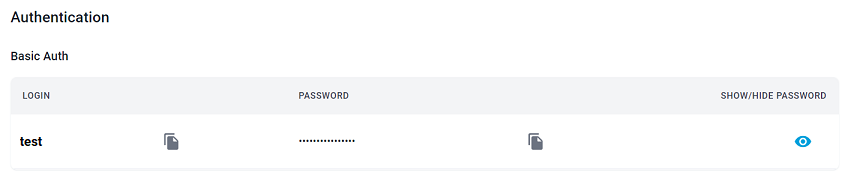
If you can't find the Login and Password parameters in the Authentication section, your tenant may have BasicAuth authentication disabled. Please contact Big Blue Marble to add this authentication method to your project configuration.
- Content id - Asset identifier - any unique value (for example GUID)
- Storage mode - File or Database
☑️ Checkbox with additional settings
Click to expand additional settings
| Option | Description |
|---|---|
| Manually define key ID | Enables defining a fixed Key ID |
| Key ID (in hex) | Enter the key identifier in hexadecimal format |

CPIX document protection ☑️ - Enables signing CPIX document with certificate Not supported by Big Blue Marble Cloud DRM ❗

Key rotation settings:
| Option | Description |
|---|---|
| Enable key rotation | Enables key rotation |
| Crypto period (in min) | Duration of the crypto period (for example, 1440 minutes) |
| Crypto period Offset(in min) | Offset to modify period alignment (0 = aligned to epoch time) |
| Index-based content key period | Uses numerical index for key periods instead of start-end dates |

Enable multi key ☑️ - Enables using multiple keys for different qualities
🎥 Video key settings:

- Intended track type - Name of the track - configuration for given name must be prepared on DRM side
- Min pixels / Max pixels - Range of pixels that uses specified keyId
- Key id - Enter auto for random keyId or fixed id of key in hex
🔉 Audio key settings:


- Intended track type - Name of the track - configuration for the given name must be prepared on the DRM side
- Key id mode - Select one of the following auto, manual, unencrypted audio
- Key Id - Only for manual mode - fixed id of key in hex
HLS
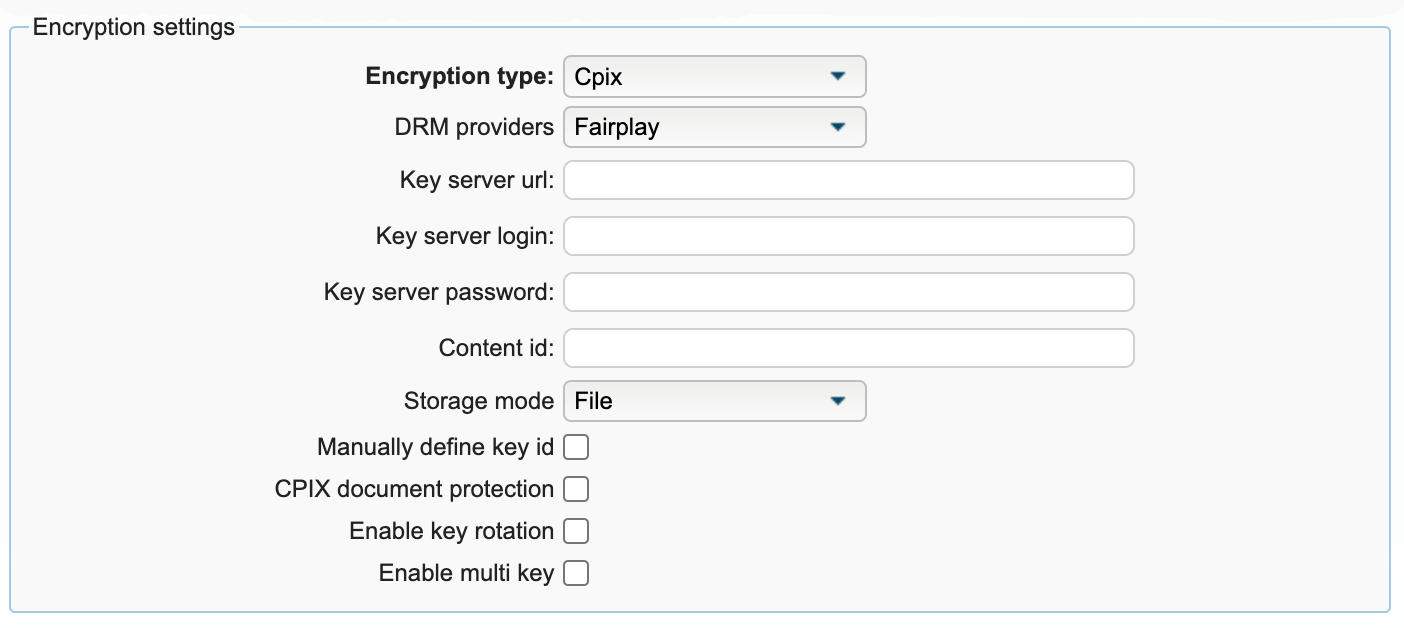
- Encryption type - Select CPIX
- DRM providers - Select Fairplay
- Key server URL - CPIX URL from the API section at Cloud Video Kit web console
- Key server login - Login from the Authentication section at Cloud Video Kit web console
- Key server password - Password from the Authentication section at Cloud Video Kit web console
If you can't find the Login and Password parameters in the Authentication section, your tenant may have BasicAuth authentication disabled. Please contact Big Blue Marble to add this authentication method to your project configuration.
- Content id - Asset identifier - any unique value (e.g. GUID)
- Storage mode - File or Database
☑️ Checkbox additional settings
Click to expand additional settings
| Option | Description |
|---|---|
| Manually define key ID | Enables defining a fixed Key ID |
| Key ID (in hex) | Enter the key identifier in hexadecimal format |
CPIX document protection ☑️ - Enables signing CPIX document with certificate Not supported by Big Blue Marble Cloud DRM ❗
Key rotation settings:
| Option | Description |
|---|---|
| Enable key rotation | Enables key rotation |
| Crypto period (in min) | Duration of the crypto period (for example, 1440 minutes) |
| Crypto period Offset(in min) | Offset to modify period alignment (0 = aligned to epoch time) |
| Index-based content key period | Uses numerical index for key periods instead of start-end dates |
Enable multi key ☑️ - Enables using multiple keys for different qualities
🎥 Video key settings:
- Intended track type - Name of the track - configuration for given name must be prepared on DRM side
- Min pixels / Max pixels - Range of pixels that uses specified keyId
- Key id - Enter auto for random keyId or fixed id of key in hex
🔉 Audio key settings:
- Intended track type - Name of the track - configuration for given name must be prepared on DRM side
- Key id mode - Select one of the following auto, manual, unencrypted audio
- Key Id - Only for manual mode - fixed id of key in hex