How to issue license
In order to obtain a license, the player must make a POST request to the appropriate endpoint (depending on the DRM system supported by the device or the browser):
- Widevine
- FairPlay
- Playready
Please check platform compatibility to see which DRM system is required in your case.
Acquisition sequence
If the video player supports DRM, it automatically generates a license acquisition event when starting playback of DRM-encrypted content. Typically, the video player must be configured with a License Acquisition URL. The player sends a POST request to this URL. The body of the license request contains payload (or "license challenge") - this payload contains cryptographic data necessary to create an encrypted license. A DRM-enabled player creates this payload data automatically. The only configuration the player needs is the License Acquisition URL and, in some cases (see below) HTTP headers for authorizing the request.
License acquisition sequence is presented in the diagram below:
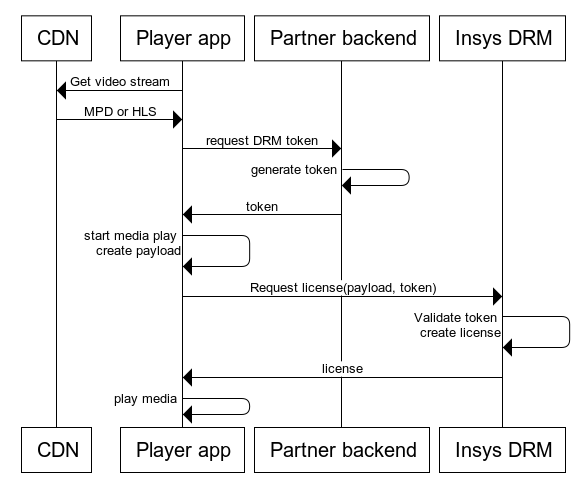
In the body of the request, the player should include the payload generated by the DRM component of your platform. This payload is automatically attached to the body of the license request by most players, so no additional code is required.
Additionally, two parameters are required to authenticate the license request:
- BrandGuid - an identifier for your application. This identifier is created by Big Blue Marble and identifies the video services. BrandGuid can be passed as a querystring parameter of the license acquisition URL or in a custom HTTP header X-Drm-BrandGuid. For a FairPlay certificate endpoint, BrandGuid should be placed in a querystring.
- UserToken - a JWT token signed with a shared secret that authorizes a given license request. The token must be created and signed by your backend service. The secret key used to sign the token must not be exposed on the frontend side. UserToken can be passed as a querystring parameter in the license acquisition URL or in a custom HTTP header X-Drm-UserToken. The token is not required for a FairPlay certificate request.
Integration parameters
Your dedicated endpoints (License Acquisition URLs) and all parameters for integration can be found in the web console. Please log in to the Cloud Video Kit web console and navigate to DRM → Configuration → License acquisition.
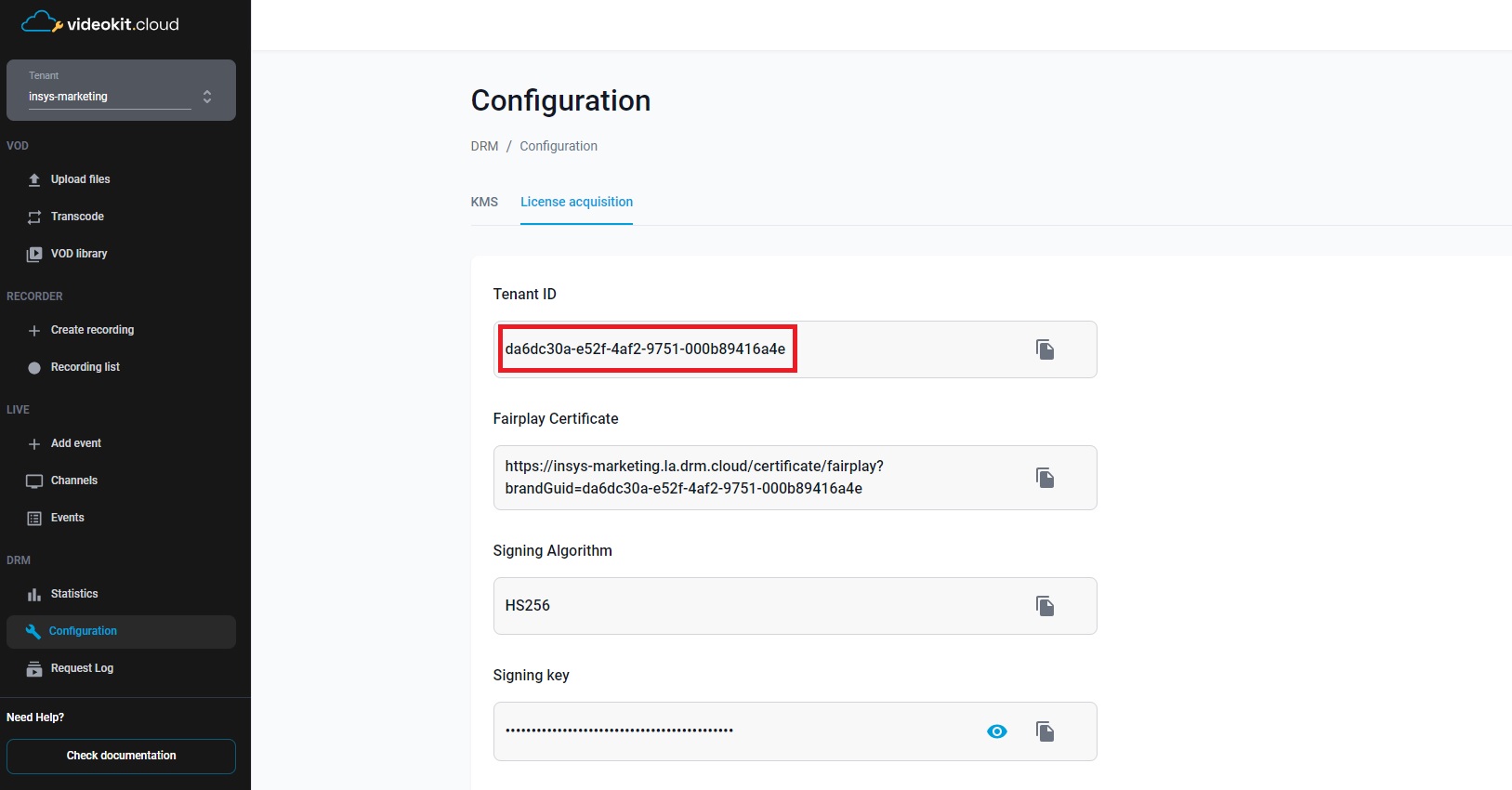
FairPlay License Acquisition URL with IV & KID
When using Apple FairPlay, the license URL must include an additional KID parameter, which contains the Key ID of the content key in GUID format. For HLS, the specific license URL is provided within the M3U8 chunklist, found in the #EXT-X-KEY tag under the URI field.
To access the chunklist, open the manifest file, copy the name of any stream (for example, "index_360p.m3u8"), and replace 'index.m3u8' in the manifest URL with the name of the selected stream.
Chunklist example:
#EXTM3U
#EXT-X-VERSION:5
#EXT-X-TARGETDURATION:11
#EXT-X-MEDIA-SEQUENCE:1
#EXT-X-PLAYLIST-TYPE:VOD
#EXT-X-KEY:METHOD=SAMPLE-AES,URI="skd://videokit-demo.la.drm.cloud/acquire-license/fairplay?
BrandGuid=5177e549-****-****-ba16-6104d4f68147&
KID=93b68891-****-****-baac-e589a13fd20c&
IV=1f3a1d7ce87a4cd3846038fcf4d05f82",KEYFORMAT="com.apple.streamingkeydelivery",
KEYFORMATVERSIONS="1",IV=0x1F3A1D7CE87A4CD3846038FCF4D05F82
The player must use the URI from the chunklist (not the manifest), and replace “skd://” with “https://”. In the example above, the license can be obtained from this link:
https://videokit-demo.la.drm.cloud/acquire-license/fairplay?BrandGuid=5177e549-****-****-ba16-6104d4f68147&KID=93b68891-****-****-baac-e589a13fd20c&IV=1f3a1d7ce87a4cd3846038fcf4d05f82.
The BrandGuid and UserToken can be passed as querystring parameters or HTTP headers as described above. The FairPlay player has to send the payload (or SPC, according to the Apple FairPlay glossary) in the license acquisition POST request. The license acquisition request can use the following Content-Type headers:
Content-Type: application/x-www-form-urlencoded- the body of the request must contain the SPC field(spc=<encoded body>).Content-Type: multipart/form-data- the body of the request must contain the SPC field.Content-Type: application/octet-stream- the body of the request must contain binary SPC data.
Depending on the request's Accept header, the server returns the license (or CKC, according to the Apple FairPlay glossary) in different formats:
- If the Accept header contains an
application/json, the JSON with the CKC field containing base64 encoded CKC will be returned as follows:{"ckc": <base64>}. Content-Type of the response will be set toapplication/json. - In other cases, the response will be of the
application/octet-streamtype and the body will contain binary CKC data.
FairPlay Streaming Certificate
To use FairPlay on production, you need to generate a FairPlay Streaming Certificate using Apple platform and share it with us. For testing purposes, we provide a temporary FPS certificate, which must be replaced with your certificate before you go live. You can find the URL to the FPS certificate attached to your tenant in the web console. Please navigate to DRM → Configuration → License acquisition → FairPlay Certificate.
Read more about FPS and how to generate your certificate here.